If your location, service area, or service pages return a 404 “Page Not Found” error immediately after installing the plugin, don’t worry — this is expected behavior and takes about 10 seconds to fix.
Why This Happens #
When Site Nitro: Locations is activated, it registers custom post types and URL rules with WordPress. WordPress needs to rebuild its internal routing table (called rewrite rules) to recognize the new URL patterns. Until that happens, requests to /locations/your-city/ or /service-areas/your-area/ don’t match any known route and return a 404.
WordPress rebuilds these rules automatically when you visit the Permalinks settings page — so the fix is just navigating there and saving.
The Fix #
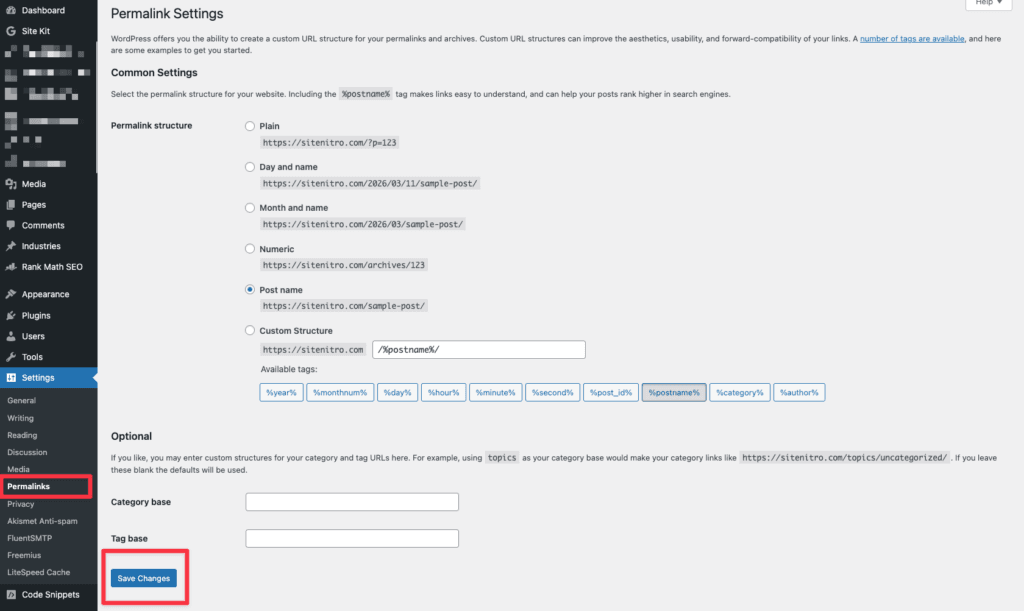
- Go to Settings > Permalinks in your WordPress admin.
- Click Save Changes — you don’t need to change anything, just click the button.
- WordPress rebuilds its rewrite rules. Your pages should now load correctly.
When Else You May Need to Do This #
You may need to flush permalinks again in these situations:
- After changing the Location Base Slug or Service Area Base Slug in plugin settings (e.g., changing
locationstoour-locations) - After updating the plugin to a new major version
- After migrating the site to a new domain or hosting environment
- If pages suddenly start returning 404s after a period of working correctly
Flushing permalinks is always safe to do. It doesn’t change any content or settings — it only rebuilds WordPress’s internal routing table.
Changing Base Slugs After Publishing #
If you change the base slugs after your pages are already indexed by search engines, the old URLs will immediately return 404s. WordPress does not automatically create redirects from the old slug to the new one. If you need to change slugs on a live site, set up 301 redirects from the old URLs to the new ones before making the change, or use a redirect plugin to handle this.
Best practice: Set your base slugs during initial setup and leave them alone.


