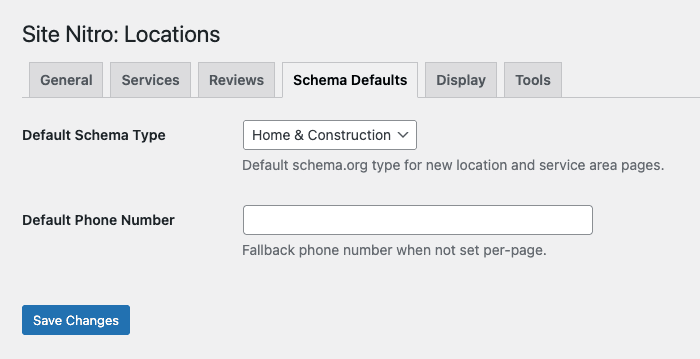
During setup, Site Nitro: Locations asks you to choose a Schema Type — the @type value used in your LocalBusiness structured data. This tells search engines what kind of business you are, which can improve how your pages appear in search results and eligibility for rich snippets like review stars and business info panels.
Why It Matters #
Google uses LocalBusiness schema to understand and display business information. The more specific your schema type, the more precisely Google can categorize your business. Specific types may also unlock additional rich result features that generic types don’t qualify for.
That said, choosing a type that doesn’t accurately describe your business is worse than using a generic one. Accuracy matters more than specificity.
Available Schema Types #
The plugin includes the most common Schema.org LocalBusiness subtypes for service businesses:
General
LocalBusiness— safe default for any business; use this if nothing more specific fits
Home & Construction
HomeAndConstructionBusiness— general contractor, remodeling, constructionHVACBusiness— heating, ventilation, air conditioningPlumberElectricianRoofingContractorLocksmithServiceHousePainterMovingCompanyPestControlService
Professional Services
ProfessionalService— general professional services (consulting, coaching, etc.)LegalService— law firms, attorneysFinancialService— accountants, financial advisorsInsuranceAgencyRealEstateAgent
Automotive
AutoRepairAutomotiveBusiness— general automotive (sales, detailing, etc.)
Other Services
DryCleaningOrLaundryMedicalBusiness— general medicalDentist
How to Choose #
If your business type is listed: Use it. A plumber should use Plumber, not HomeAndConstructionBusiness or LocalBusiness.
If your business type isn’t listed: Choose the closest parent category. For example:
- Appliance repair →
HomeAndConstructionBusiness(noApplianceRepairsubtype exists in Schema.org) - Landscaping →
HomeAndConstructionBusiness - Bookkeeping →
FinancialService - Chiropractor →
MedicalBusiness
If nothing fits well: Use LocalBusiness. It’s always valid, always accurate, and Google handles it fine. Don’t force a specific type that misrepresents what you do.
This Is a Site-Wide Setting #
The schema type you select applies to all Location and Service Area pages on the site. It’s a single setting because the assumption is that a site built with this plugin represents one business (or franchise/chain of the same business type).
If you manage sites for multiple different business types, you’ll set this once per site during initial configuration.
Where This Value Appears #
Your schema type appears in the @type property of the LocalBusiness entity output on every Location and Service Area page. You can verify it by running any page URL through Google’s Rich Results Test and looking at the detected schema.
Changing the Schema Type Later #
You can update the schema type at any time in Settings > Site Nitro: Locations > Schema & Appearance. The change takes effect immediately on all pages — there’s no need to re-save individual pages. If your pages are already indexed, Google will pick up the updated schema on its next crawl.


