Site Nitro: Locations has two distinct page types for geographic coverage: Locations and Service Areas. They look similar on the surface, but they serve different purposes — and using the right one matters for schema accuracy and local SEO.
The Simple Rule #
| Use a Location when… | Use a Service Area when… |
|---|---|
| The business has a physical address in that city | The business serves that city but has no physical address there |
| Customers can visit or walk in | The business travels to customers |
| You have an office, storefront, or warehouse there | You work out of a home base and cover surrounding towns |
Examples:
- A plumbing company headquartered in Kalispell that also takes jobs in Whitefish and Columbia Falls → One Location (Kalispell) + Service Areas (Whitefish, Columbia Falls)
- A cleaning company with offices in both Missoula and Billings → Two Locations
- A mobile dog groomer who covers 10 zip codes from a single base → One Location + Service Areas for each city they cover
Why the Distinction Matters for Schema #
Google treats these page types differently in structured data:
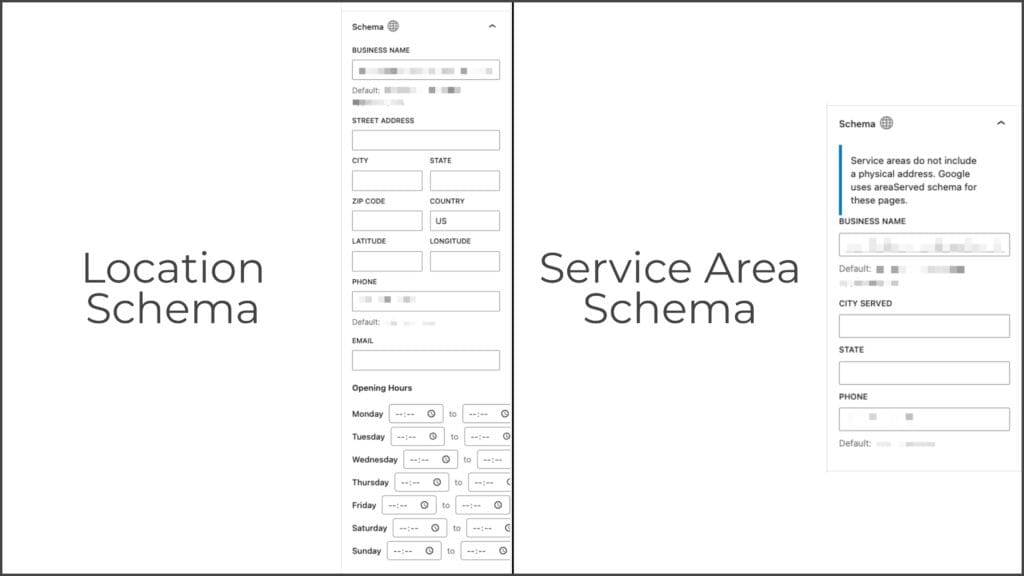
Location pages output a LocalBusiness schema entity with a full PostalAddress — street address, city, state, zip. This signals to Google that the business has a verifiable physical presence at that address.
Service Area pages output a LocalBusiness schema entity with an areaServed field instead of a postal address. This signals geographic coverage without implying a physical location.
Using a Location for a city where you don’t actually have a physical address — or fabricating a PO box to fill the field — can create schema markup that misrepresents the business to Google. Service Areas are the accurate, intended solution for businesses that serve an area without being physically located there.
How They Behave Differently on the Page #
Location pages include:
- Street address displayed in the NAP bar (Name, Address, Phone)
- Full address in schema markup
- Address used in map embeds (if applicable)
Service Area pages include:
- City and state displayed (no street address)
areaServedin schema instead of postal address- No address field in the editor (it’s intentionally absent)
The Service Areas Archive Page #
The /service-areas/ archive page (whatever base slug you’ve configured) displays both Service Areas and Locations together, sorted alphabetically. This is intentional — from a customer’s perspective, this page is “everywhere we work,” and Locations are also places you work.
The /locations/ archive shows only Locations. This is useful for multi-location businesses that want a dedicated “find a location near you” page separate from their broader coverage map.
When You’re Not Sure #
If the business has any kind of physical presence — even a home office that customers don’t visit — use a Location for that address. Use Service Areas for everywhere else you serve. When in doubt, the schema difference is: do you have a real street address to list for this city? If yes, Location. If no, Service Area.


